How it finds the moments
Every stage runs on a real signal - speech, sound, motion, and what viewers actually rewatched. Nothing below is a description of what the pipeline could do: it is what this install does, including the two things it deliberately does not.
The short version
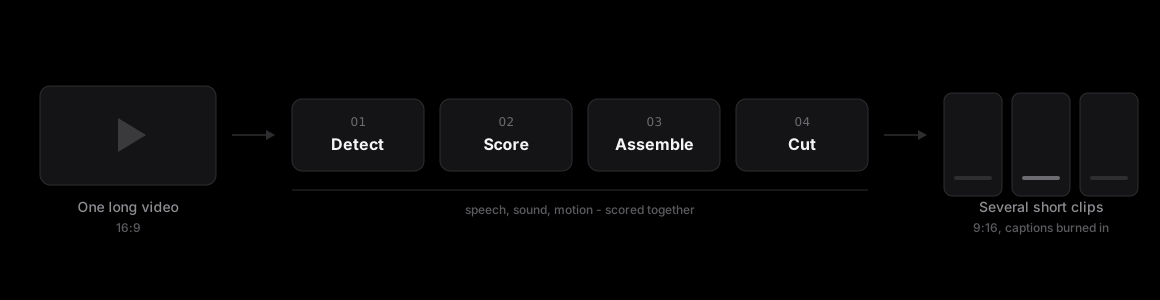
- 01DetectSplit the source into shots, and merge the fragments too short to matter. A clip starts from a real cut in the footage, never an arbitrary time slice.
- 02ScoreRate every moment on sound, motion, speech and real rewatch data. Real signals, not a guess - audio, motion, transcript and rewatch data where it exists.
- 03AssembleGrow a clip around each peak, then snap its edges to a natural pause. Built to fit, not sliced - a clip never stops mid-sentence.
- 04CutFit the whole frame into 9:16, over a blurred copy of itself filling the bars. Nothing is cropped away - the entire picture survives the reframe.
What goes in
A video file you upload. Long-form video is what the pipeline is built for - a podcast episode, an interview, a webinar recording, a conference talk.
Black bars already baked into the source are detected and stripped before anything else runs. A 1920×1080 download whose real picture is 1568×1080 behind 176 pixels of padding each side would otherwise carry that padding through every later stage.
Finding the cuts
The source is split into shots by scene detection, and fragments too short to be worth anything are merged back into their neighbours. This matters because it decides what a clip is allowed to be: a clip boundary is a real cut in the footage, not an arbitrary point on a timeline.
The alternative - slicing a video into fixed-length windows and scoring each one - is simpler and produces clips that start in the middle of shots. Nothing downstream can fix that.
Reading the video
Three passes run over the material. Audio energy finds the loud moments - a laugh, an interruption, applause, someone raising their voice. Motion analysis finds the ones where something happened on screen. And speech-to-text transcribes the whole thing with word-level timestamps.
Transcription runs locally, on the machine doing the processing, rather than through a cloud speech API. That is a privacy property rather than a performance one: the audio of your video is not sent to a third party to be turned into text.
Word-level timing is the part that matters later. It is what lets a clip boundary snap to an actual pause between sentences, and it is what makes the captions land on the right frame instead of drifting a third of a second behind the speech.
Scoring the moments
The signals are combined into a score per moment, and the strongest candidates go to an AI pass - Gemini, seeing both keyframes from the moment and the real transcript of what is said in it.
Seeing the transcript is the distinction worth drawing out. A model shown only thumbnails is judging whether a frame looks interesting, which is a proxy for the wrong thing: the best moment in an interview looks exactly like the worst one. Given the words, it is judging the moment.
Your plan sets a ceiling on how many clips come out. Quality decides the number underneath it - a video with four moments worth keeping produces four, rather than the allowance padded out with weaker cuts.
Assembling a clip
A clip grows outward from its scored peak until it has enough context to make sense, then each edge snaps to the nearest pause in the transcript. That is the difference between a clip that opens on the start of a thought and one that opens three words into it.
Trimming a finished clip re-runs this, rather than cropping the rendered file. The captions re-time to the new boundaries instead of sliding out of sync with them.
Making it vertical
The output is 9:16. What happens to the parts of a landscape frame that do not fit is a real decision, and this install makes it one way: the whole original frame sits at full width in the middle of the vertical canvas, with a blurred, darkened copy of itself filling the bars above and below. Nothing is cropped and nothing is lost.
The other option - crop a vertical slice and scale it up, following a speaker where one can be tracked - fills the screen edge to edge, and throws away whatever falls outside the slice. It suits a single talking head centred in frame. It quietly deletes the second person in an interview, the slide beside the presenter, and anything written across a wide shot.
So there is no face tracking in what ships today, because tracking exists only to decide where to crop, and nothing is being cropped.
Captions
Captions are burned into the picture, generated from the transcript that was already produced for scoring rather than from a second pass over the finished clip. They highlight word by word as they are spoken, which is possible because the timings are word-level.
Speech recognition is weakest on names, jargon and anything said over music. Where a word matters and the audio is poor, trimming the clip afterwards re-runs the transcription over the new boundaries rather than shifting the old captions.
What comes out
Ordinary MP4 files. Download them one at a time or take the set as a ZIP. There are no restrictions on what you do with them, and no watermark on a paid plan.
Finished clips stay downloadable for 90 days and are then deleted. Source videos stay until you delete them.